Monday, September 1, 2008

While You are Learning PowerShell...

I think everyone sees the potential of PowerShell for managing Windows 2008, as well as for managing VMware,  but learning PowerShell is not an overnight task for most of us.   So while we are all pondering the scripts posted in the VMware PowerShell scripting contest, and feverishly reading up on PowerShell - I thought I would post one of my favorite "old school" VMware utility sites. 

www.run-virtual.com

a colleague in a Redhat class had told me about this site when we were talking about implementing trunking, and how many changes that would take in our fairly large environment.   He suggested I check out the  ITQ VLan and Portgroup Manager.   It was definitely a time saver.  

We also tried some of the other utilities on his site, and found them to be useful.  The gentleman that runs the site is actually a technology evangelist for VMware in the EMEA region.  

Some of these tools could definitely fill the gap while we are all becoming VMware PowerShell masters.  

Sunday, August 31, 2008

Applying XenServer Updates

I've been playing with the XenServer 4.1 product on a low end spare server I have laying around. To it's credit XenServer is the only one the big three hypervisors that will run on this Pentium D 820 server, as Hyper-V requires DEP, 64bit and processor side virtualization, and ESX3i requires specific approved hardware to function. Granted, without the processor virtualization assistance, XenServer is limited to deploying Linux guests only, it's still enough to be able to play with the interface and deploy some basic machines.

While not a complex and deep as VMware Update Manager, I am impressed with Citrix's simple "just the servers" approach to patching. While we are deploying VMware Update Manager to handle the ESX hosts, I can't see us ever using the guest patching capabilities, nor could I see any large organization doing so. In my opinion , most large IT shops won't want to maintain a separate update process for virtual machines and a separate update process for physical machines, despite the ability to roll back changes and other benefits of VMware Update Manager.

One of the best features of Citrix's product is their "Check For Updates" launcher. It gives you a clear view of what updates you already have, and which updates you should apply. Along with the download links are links to the patch notes. While it is much more rudimentary than VMware Update Manager, I appreciate the simplicity.
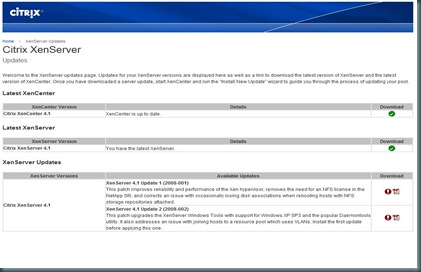
xencenterupdates

The Citrix patching utilities obviously don't compare with VMware Update Manager, but they certainly have the advantage over the VMware patching website. :
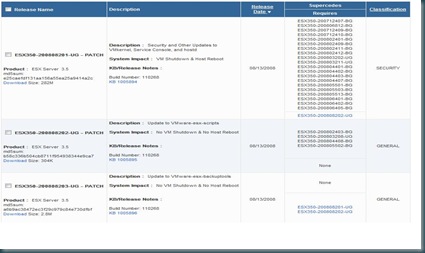
vmwarewebupdates

I found the deployment of the updates once they were downloaded to be incredibly simple, and the updater to be intelligent when it came to evaluating the server receiving the patches. It first attempted to evaluate moving the guest to another host, which was impeded by the fact I only have one server. Once it realized there were no migration options, it suspended the VM while applying the update and rebooting. After communication was re-established with XenCenter, the guest was resumed automatically. End to end, a pretty simple and intelligent process.

I hope VMware and Citrix (as well as Microsoft) are learning from each other, and improving their products based on their competitors strengths and weaknesses. I would like to see VMware implement a "simple" host updater into a future version of VirtualCenter. I will also be watching to see if XenCenter implements some of the more advanced features of VMware Update Manager directly into XenCenter.

Thursday, August 28, 2008

PowerShell for VMware

Rich over at VM/ETC just posted a great bunch of links to various PowerShell scripts that he has run across in his Internet travels, as well as some links on learning the PowerShell scripting language.

http://vmetc.com/2008/08/27/powershell-scripting-examples-for-vmware-virtual-infrastructure/

One other link I had planned on posting as well was one from the Planet VMware blog : Managing VMware with PowerShell Webinar

I expect that the VMware Developer Center's PowerShell scripting contest should yield many interesting new VMware PowerShell scripts once it's finished.

Monday, August 25, 2008

Free Microsoft Training - How Cool is That ?

Have you been waiting for an introduction to the some of the newer Microsoft technologies?  Wait no longer,  Microsoft Learning has something prepared for you,  assuming you have a few hours to spare.  

Microsoft is branding them as clinics,  but I think the name doesn't do them justice.    They are interactive and engaging combinations of video presentations, demos, interactive content, and quizzes.   Now I wouldn't recommend them as study guides for the MCITP exams,  but they are definitely not "fifty thousand foot view" marketing slides either.   Most of them appear to have a 90 day subscription, so if you don't have 2 whole hours to spend, you can chip away at it a little at a time.  

Clinic 5935: Introducing Hyper-V in Windows Server 2008
Clinic 5938: Introducing Terminal Services Presentation Virtualization in Windows Server®2008
Clinic 5936: Introducing Security and Policy Management in Windows Server® 2008
Clinic 5939: Introducing Server Management in Windows Server®2008
Clinic 5937: Introducing Branch Office Management in Windows Server®2008

To review all the free clinics available from Microsoft click the link below.   There's a large variety of content available at the best possible price.   I suspect some of the material is only free temporarily,  so don't wait too long to give it a try.
Microsoft Learning - Free Content

They also appear to be releasing a large amount of content for a $39 usd per two hours of content price point as well.   I plan on giving a couple a try and assessing whether they are still a great value at $39.

Wednesday, August 20, 2008

VMware Joins the SVVP

In a letter from the CEO of VMware today it was announced that VMware is in the Server Virtualization Validation Program. I'm fairly sure they weren't on the list yesterday when I checked. This officially ends any ambiguity of whether you will be fully supported using VMware with Microsoft products.

VMware in the SVVP is a great win for them, but I don't think it dulls Microsoft's new advantage of having the only virtualization platform that is guaranteed not to have to be reproduced on physical hardware.

You can read VMware's statement here :
The Console : VMware is in the SVVP

Tuesday, August 19, 2008

One Small Press Release for Microsoft, One Giant Leap for Virtualization

Microsoft made a major annoucnement today regarding the licensing and support of their products in the virtual environment, and even threw a curveball in one of the linked kb article.

First up, the shift in licensing policy. previously Microsoft licensing was tied to server named instances, with a single move permitted every 90 days. This announcement seems to be suggesting a move toward capacity on demand. The other part of the announcement was a brief explanation of the much longer new Microsoft whitepaper on licensing on virtual hardware, found here: Microsoft Server Products in Virtual Environments I didn't find anything too surprising in the document.

The other half of the announcement was an explanation of what the SVVP is, and how it is going to help you when you need to call Microsoft for support. The SVVP is the Server Virtualization Validation Program. Similar to the move by Citrix to expands the ranks of it's application ISV partners, Microsoft has created a program to enhance cooperation among TSanet members with a focus on virtualization. The cost of entry is not too bad, as they are requiring a TSanet membership (this appears to be $1500 annually), and $250 per virtualized configuration. It will not be a logo program, but rather a list of certified vendors and applications maintained by Microsoft. I think this will help reduce finger pointing between application vendors that are members, but it is not a seismic shift in policy, as Microsoft still reserves the right to require a virtual instance to be reproduced outside of the 3rd party virtualization environment. Some industry heavyweights have already joined the program, including the expected such as Citrix and Cisco, and at least one surprise, Sun Microsystems.

Now for the curveball. It was very subtle, hidden in the kb article associated with the press release. I don't know if you noticed that when I mentioned reproducing a problem, I didn't say "on physical hardware". Microsoft has announced that you now have the choice of reproducing the problem on physical hardware *or* in Hyper-V. Now, that is a brilliant move by Microsoft, that may lead to beachheads of Hyper-V in otherwise pure VMware or XenServer shops.

Citrix Throws Down the Gauntlet

How many times have you heard "I don't know if my application works in Citrix?", or XenServer, VMware, Windows 2003...and so on.

Usually getting on the approved list involves heavy investment, and a good relationship between the companies involved in the agreements. Definitely not something your smaller or more specialized application vendors can afford, or in some case have any interest in. This usually leads to testing in our corporate environments. I have even had application vendors go as far as request documentation on how we installed their product, so they could market their product as having a Citrix install procedure.

Citrix has thrown down the gauntlet with a new approach, which will get all of us out of the business of providing functionality testing for vendor applications in our environments. Citrix is now offering a free partnership level, which provides access to Citrix testing labs for 3-7 days.

I applaud this move, and I would love to see other vendors adopt this approach.

Read more about this announcement at :
http://community.citrix.com/pages/viewpage.action?pageId=29851667